Image AI, right inside your Photoshop.
NT AI Studio is a native Photoshop plugin for the 3D team: generate images from a prompt, edit any selection with an instruction or a real mask, and upscale your final composite — all without ever leaving the canvas.
Four tabs, one panel.
Native sp-* Photoshop widgets — the panel feels like it shipped with the app, not bolted on.
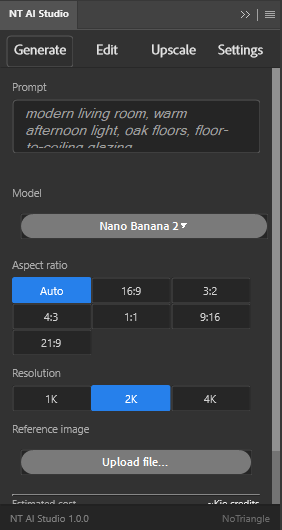
Prompt + optional reference image → new layer. Nano Banana 2 by default, Auto aspect ratio, up to 4K.
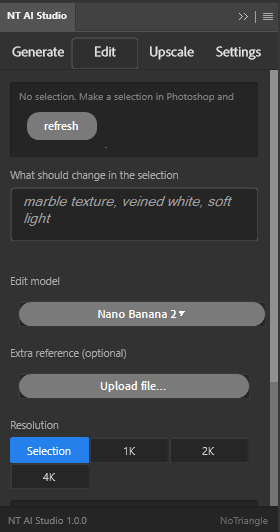
Make a selection in Photoshop, describe the change, pick a resolution up to 4K — the rest is preserved.
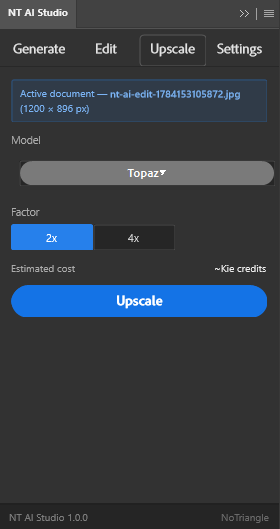
2x or 4x with Topaz, saved as a brand-new file on disk — your open document is never touched.
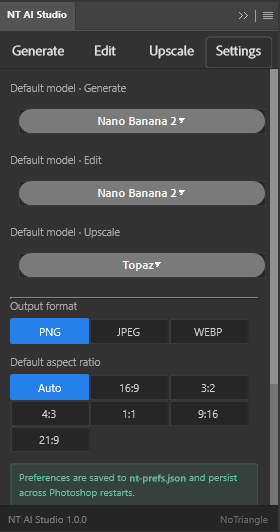
Default model per function, output format and aspect ratio — saved to nt-prefs.json, per artist.
Built for the post-production step.
Two providers under the hood (Kie.ai primary, Replicate fallback) — you just pick a model and a resolution.
Generate
Text-to-image with an optional reference image, inserted straight into your document as a new layer.
Nano Banana 2 defaultEdit by selection
Instruction-based edits or a real mask (FLUX Fill / Ideogram) that repaints only the selection, byte-for-byte outside it.
Auto preservation preambleUpscale
Upscales the active document 2x or 4x with Topaz and saves a new file — never overwrites your working file.
Saves to disk, not a layerSettings
Default model per function, output format (PNG/JPEG/WEBP) and aspect ratio, persisted per artist across restarts.
nt-prefs.jsonA few results from the team.
Generated and refined in-panel during real post-production passes.




Two ways in — pick either.
Full walkthrough (with screenshots and API key setup) is in the PDF guide above.
Unzip into Plug-ins
- Download and unzip
NT_IA_Studio_PS.zip. - Open
NT AI Studio.zipinside it and extract its contents. - Copy the extracted folder into your Photoshop
Plug-insfolder. - Restart Photoshop — the plugin appears under Plugins.
Double-click the .ccx
- Download and unzip
NT_IA_Studio_PS.zip. - Double-click
NT-AI-Studio_PS.ccx. - Creative Cloud Desktop installs it automatically.
- Open Photoshop — the plugin appears under Plugins.
Two providers, your own bill.
Kie.ai is tried first wherever a model is available there; Replicate is the fallback with confirmed, fixed pricing. Every model below is picked per job, right in the panel.
Generate
- Nano Banana 2 default KieReplicate$0.067–0.151
- Nano Banana Pro KieReplicate$0.15–0.30
- Seedream 4.5 KieReplicate$0.04
- FLUX.2 Pro KieReplicate~$0.03/MP
- Seedream 4 Replicate$0.03
Edit
- Nano Banana 2 default KieReplicate$0.067–0.151
- Nano Banana Pro KieReplicate$0.15–0.30
- Seedream 4.5 KieReplicate$0.04
- FLUX Kontext Pro KieReplicate$0.04
- Ideogram V3 mask KieReplicate$0.03
- FLUX Fill Pro mask Replicate$0.05
Upscale
- Topaz default KieReplicate~$0.05–0.20/MP
- Recraft Crisp Kie~Kie credits
- Clarity Pro Replicate~$0.03/MP
- Google Upscaler Replicate$0.02
- Real-ESRGAN Replicate~$0.002

Kie.ai — prepaid credits
Kie doesn't publish a fixed price per model — the panel shows ~Kie credits until a job runs, then reads the real cost straight from that job. Roughly 1 credit ≈ $0.005; new accounts start with a small free grant.
Create a Kie.ai account
Replicate — pay-as-you-go
Fixed, confirmed price per model/resolution (shown above) charged straight to your Replicate account on every run. No subscription, no studio-wide pool — just usage.
Create a Replicate account